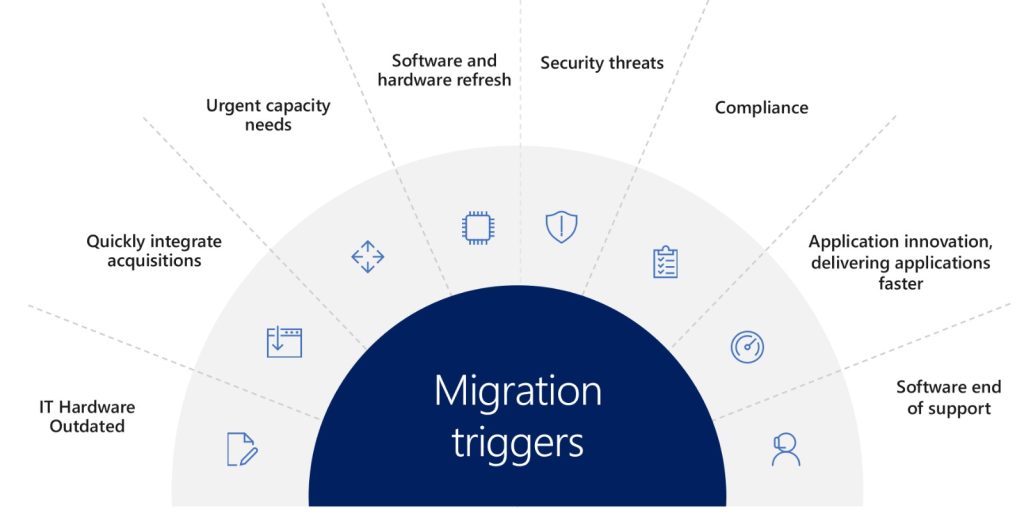
Migration triggers...
IT Hardware outdated
IT hardware becoming outdated can be a major trigger for Migration activity. Some of the common triggers include:
- Software Upgrades: When a new software version or application is released, it often requires a more advanced hardware configuration than the previous version. This means that older hardware may not be compatible with the new software, making it outdated.
- Increased Workloads: As businesses grow, your organisation’s IT needs change, which means that the workloads placed on IT hardware can increase significantly. Older hardware may not be able to handle the increased demands, resulting in slower performance and decreased productivity.
- Security: As cyber threats become more sophisticated, older hardware may not have the necessary security features to protect against new threats. This can make the hardware vulnerable to cyber-attacks, potentially resulting in data breaches and other security issues.
- Cost-Effectiveness: Upgrading to newer hardware can sometimes be more cost-effective than maintaining older hardware. Older hardware may require more frequent repairs and maintenance, which can add up over time and make upgrading more economical in the long run.
Overall, migration can trigger IT hardware to become outdated as the business’s IT needs change, technology advances, and security risks increase. It’s essential for businesses to stay up-to-date with their IT hardware to ensure optimal performance, security, and productivity.
Quickly integrate acquisition
When a company acquires another company, it often needs to integrate the acquired company’s technology infrastructure with its own. This can be a complex and time-consuming process, but migration can help quickly integrate the acquisition by:
- Standardizing Technology: Migrating the acquired company’s technology infrastructure to the same platforms and systems used by the acquiring company can help standardize the technology environment. This can make it easier to manage and support the technology, reduce complexity, and ensure compatibility across the organization.
- Consolidating Data: Migrating data from the acquired company’s systems to the acquiring company’s systems can help consolidate data in one place. This can make it easier to access and analyze data, and provide a single source of truth for reporting and analysis.
- Streamlining Processes: Migrating to the acquiring company’s processes and procedures can help streamline operations and reduce duplication of efforts. This can help the organization operate more efficiently and effectively, and reduce costs.
- Improving Collaboration: Migrating to a common technology environment can help improve collaboration and communication across the organization. This can facilitate knowledge sharing, promote teamwork, and help build a unified culture.
Overall, migration can help quickly integrate an acquisition by standardizing technology, consolidating data, streamlining processes, and improving collaboration. It’s essential for companies to carefully plan and execute the migration to ensure a successful integration and minimize disruption to the business.
Urgent capacity needs
Migration can be triggered by urgent capacity needs when a business’s current IT infrastructure is unable to meet its growing capacity requirements. Some of the common triggers include:
- Increased Workloads: As businesses grow, the amount of data and workloads they handle can increase significantly. If the current IT infrastructure cannot handle the increased workload, migration to more powerful hardware or cloud-based services may be necessary.
- Peak Season: Businesses that experience seasonal fluctuations in demand may need to quickly scale up their capacity during peak season. Migration to cloud-based services or other scalable solutions can help meet the increased demand.
- New Projects: When businesses launch new projects or initiatives that require additional IT capacity, migration to more powerful hardware or cloud-based services may be necessary.
- Performance Issues: If the current IT infrastructure is experiencing performance issues, such as slow response times or frequent downtime, migration to more powerful hardware or cloud-based services can help improve performance and minimize downtime.
Overall, migration can be triggered by urgent capacity needs when businesses need to quickly scale up their IT infrastructure to meet growing demand. It’s important for businesses to plan and execute the migration carefully to ensure minimal disruption to operations and maximize the benefits of the migration.
Software and Hardware refresh
Migration can be triggered by the need for a software and hardware refresh when the current IT infrastructure becomes outdated and no longer meets the business’s needs. Some of the common triggers include:
- End of Life (EOL) Support: When software or hardware reaches its end-of-life (EOL) support, it means that the vendor will no longer provide support or security updates. This can leave the business vulnerable to security risks and compatibility issues. Migration to newer software or hardware can help ensure ongoing support and security.
- Performance Issues: If the current software or hardware is unable to keep up with the business’s growing needs, it can result in performance issues, such as slow response times or frequent downtime. Migration to more powerful hardware or software can help improve performance and minimize downtime.
- Compatibility Issues: When new software or hardware is introduced into the IT infrastructure, compatibility issues can arise with the existing infrastructure. Migration to newer software or hardware can help ensure compatibility across the IT environment.
- Cost-Effectiveness: Upgrading to newer software or hardware can sometimes be more cost-effective than maintaining the older software or hardware. Older software or hardware may require more frequent repairs and maintenance, which can add up over time and make upgrading more economical in the long run.
Overall, migration can be triggered by the need for a software and hardware refresh when the current IT infrastructure becomes outdated and no longer meets the business’s needs. It’s essential for businesses to stay up-to-date with their IT infrastructure to ensure optimal performance, security, and productivity.
Security threats
Migration can be triggered by security threats when a business’s current IT infrastructure is vulnerable to security threats, and migrating to a more secure environment is necessary to protect the business’s data and systems. Some of the common triggers include:
- Outdated Security Measures: If the current IT infrastructure is using outdated security measures, it can leave the business vulnerable to cyber attacks. Migration to a more secure environment, such as a cloud-based platform with robust security features, can help minimize the risk of security breaches.
- Data Breaches: If the business has experienced a data breach, migration to a more secure environment can help prevent future breaches. This may involve encrypting sensitive data, implementing multi-factor authentication, or migrating to a cloud-based platform with more robust security features.
- Compliance Requirements: Businesses that are subject to industry or regulatory compliance requirements may need to migrate to a more secure environment to meet those requirements. This may include migrating to a cloud-based platform with compliance certifications or implementing more stringent security measures.
- Advanced Threats: As cyber threats become more sophisticated, older security measures may not be sufficient to protect against new threats. Migration to a more secure environment with advanced security features, such as machine learning-based threat detection and response, can help mitigate the risk of advanced threats.
Overall, migration can be triggered by security threats when businesses need to migrate to a more secure environment to protect their data and systems from cyber attacks. It’s essential for businesses to carefully plan and execute the migration to ensure a successful transition and minimize disruption to the business.
Compliance
Migration can be triggered by compliance requirements when a business’s current IT infrastructure does not meet the required compliance standards. Some of the common triggers include:
- Changes in Regulations: Changes in regulations or industry standards may require businesses to update their IT infrastructure to ensure compliance. This may include upgrading software or hardware, implementing new security measures, or migrating to a cloud-based platform with more robust compliance certifications.
- Business Expansion: As businesses expand into new markets or jurisdictions, they may become subject to new compliance requirements. Migration to a more compliant environment, such as a cloud-based platform with compliance certifications in the new market, can help ensure compliance with local regulations.
- Audit Findings: Audit findings may reveal compliance gaps in the current IT infrastructure, which may require migration to a more compliant environment to address the gaps.
- Customer Requirements: Customers may require businesses to demonstrate compliance with certain standards or regulations. Migration to a more compliant environment can help businesses meet customer requirements and win new business.
Overall, migration can be triggered by compliance requirements when businesses need to update their IT infrastructure to meet compliance standards. It’s important for businesses to carefully plan and execute the migration to ensure compliance with regulations and minimize disruption to the business. Compliance should always be a top priority to ensure the protection of sensitive data and the business’s reputation.
Application invoice delivering application faster
Migration can be triggered by the need to deliver applications faster when the current IT infrastructure is not able to support the speed of application delivery required by the business. Some of the common triggers include:
- Slow Application Performance: When applications are slow to perform, it can impact business productivity and customer satisfaction. Migration to a more robust infrastructure, such as a cloud-based platform, can help improve application performance and speed.
- Limited Scalability: When the current IT infrastructure cannot scale to support increased application demands, migration to a more scalable environment is necessary. This may include migrating to a cloud-based platform that can automatically scale up or down to meet changing demands.
- Legacy Infrastructure: Legacy infrastructure can be a barrier to delivering applications faster, as it may not be able to support modern development methodologies, such as DevOps. Migration to a more modern infrastructure, such as a cloud-based platform, can help enable faster application delivery using modern development methodologies.
- Inadequate Testing Environments: Inadequate testing environments can slow down application delivery, as developers may not have the necessary resources to test applications thoroughly. Migration to a more robust testing environment, such as a cloud-based testing platform, can help developers test applications faster and more effectively.
Overall, migration can be triggered by the need to deliver applications faster when the current IT infrastructure is not able to support the speed of application delivery required by the business. It’s important for businesses to carefully plan and execute the migration to ensure a successful transition and minimize disruption to the business. Faster application delivery can help businesses stay competitive and meet customer demands.
Software end of support
Migration can be triggered by software end of support when a business’s current software is no longer supported by the vendor, leaving it vulnerable to security risks and compatibility issues. Some of the common triggers include:
- Security Risks: When software reaches end of support, it will no longer receive security updates or patches, leaving the business vulnerable to security risks. Migration to a new software platform that is still supported can help ensure the business’s data and systems are secure.
- Compatibility Issues: When software reaches end of support, it may no longer be compatible with other software applications or hardware. Migration to a new software platform that is still supported can help ensure compatibility with other applications and hardware.
- Compliance Requirements: When software reaches end of support, it may no longer meet compliance requirements, leaving the business at risk of penalties or fines. Migration to a new software platform that is still supported can help ensure compliance with regulations.
- Limited Features: When software reaches end of support, it may not support new features or functionality that are required by the business. Migration to a new software platform that is still supported can help ensure access to the latest features and functionality.
Overall, migration can be triggered by software end of support when businesses need to update their software to ensure security, compatibility, compliance, and access to the latest features and functionality. It’s important for businesses to carefully plan and execute the migration to ensure a successful transition and minimize disruption to the business.
Contact DMBR Consulting today to discuss your Organisation’s Migration needs!. What ever they may be as explained above, we will be there to support you with all activities related to Migration.